Overview
This lesson plan was created by me and a colleague as part of our practical teaching experience. It uses OctoStudio to help students understand the stages of a butterfly's lifecycle through hands-on, block-based coding. A well-designed lesson plan is the backbone of effective instruction, giving teachers a clear roadmap of goals, activities, and assessments. Thoughtful planning ensures that technology serves the learning objectives rather than distracting from them. The cards below share the lesson plan itself along with the digital tools that support it.
This lesson plan was designed by me and a colleague to teach the stages of a butterfly's lifecycle using OctoStudio, a free block-based coding app from the MIT Media Lab. My group redesigned an existing lesson to integrate technology, as well as align it to standards and Universal Design for Learning (UDL). Students build a simple interactive project that moves through the egg, caterpillar, chrysalis, and butterfly stages, reinforcing the science content as they code. The activity pairs a familiar life-science topic with hands-on computational thinking, making abstract concepts concrete and memorable. The plan includes clear objectives, step-by-step instructions, and checkpoints to gauge student understanding. It is built to be approachable for young learners who may be coding for the first time. Click the button below to open the full lesson plan and see the complete structure and materials.
Open Lesson Plan (PDF)
→
A QR code is a scannable square barcode that stores a link or piece of information, opening instantly when a student points a device camera at it. In the classroom, QR codes turn any printed page, poster, or worksheet into a gateway to digital content without students needing to type long web addresses. Teachers can use them to share lesson materials, link to interactive activities, or guide students to a project like the one in this lesson. They are quick to create, easy to distribute, and especially helpful for young learners who are still building typing skills. This makes QR codes a simple but powerful bridge between physical and digital learning. The QR code shown above links directly to the OctoStudio home page, the same tool used in this lesson. Use the button below to create your own QR code with a free online generator.
Open QR Code Generator
→
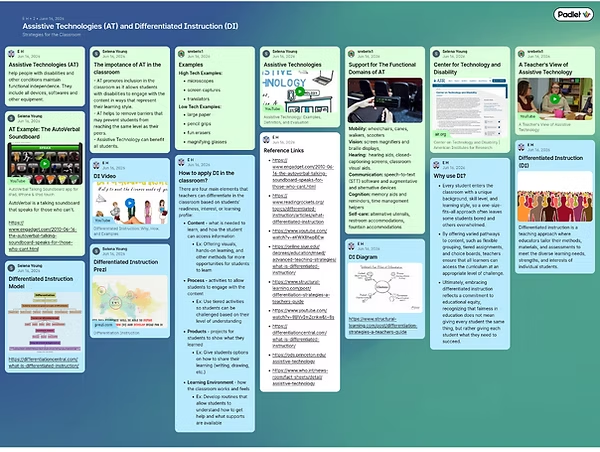
Padlet is a free online tool that works like a digital bulletin board, letting users post text, images, links, and videos to a shared, collaborative space. The digital poster shown here was created with my colleagues and explores Assistive Technologies (AT) and Differentiated Instruction (DI), two approaches that help teachers support every learner. Assistive technology refers to the tools and specialized equipment that give students with disabilities greater access to learning, from talking soundboards that speak for those who cannot to devices that aid mobility, hearing, and communication. Differentiated instruction is a teaching approach where educators adjust the content, process, and products of a lesson to meet the diverse needs, strengths, and interests of individual students. In the classroom, Padlet supports collaboration by letting students and teachers contribute to the same board in real time from any device. Visit Padlet using the button below to explore the tool for yourself.
Visit Padlet
→